Flujos
Un flujo es un guion de conversación con ramas: envía mensajes, hace preguntas y ejecuta acciones (registrar un socio, dar puntos, recibir un ticket). Menú: Marketing › Conversacional › Flujos.
Permiso Flujos de conversación (crear, editar y eliminar tienen permisos propios) · Edición Growth y Enterprise (función Conversation Flows).
Listado
Busca con Buscar... y pulsa Refrescar para recargar. Pulsa Crear Nuevo para abrir la galería de plantillas.
| Columna | Qué es | Notas |
|---|---|---|
| Name | Nombre del flujo y su descripción | La interfaz muestra estas cabeceras sin traducir |
| Channel | Canal donde corre el flujo | |
| Keywords | Palabras de activación | |
| Audience | Público objetivo; segmento, nivel o rango de puntos si los hay | |
| Campaign | Campaña vinculada | - si no tiene |
| Active | Si el flujo está en uso | La etiqueta borrador indica cambios sin publicar |
En Acciones tienes:
- Edit properties: abre el formulario de propiedades (ver abajo).
- Edit flow: abre el editor de tarjetas.
- Duplicar: crea una copia.
- Guardar como plantilla: la guarda en Mis plantillas de la galería.
- Eliminar.
Crear un flujo desde una plantilla
- Pulsa Crear Nuevo. Se abre la galería.
- Elige una plantilla o Blank (lienzo vacío). Tus plantillas guardadas están en Mis plantillas.
- Revisa cuántos nodos añade y qué variables espera, y pulsa Apply. Se abre el editor con un borrador.
La galería incluye seis plantillas: WhatsApp welcome + enrolment, QR scan → game → reward, Birthday campaign, Survey → coupon, Cart abandonment y NPS → segmentation. Sus nombres salen en inglés en la interfaz.
Propiedades del flujo
Con Edit properties (o al crear) se abre Editar flujo / Crear nuevo flujo.
| Campo | Qué es | Notas |
|---|---|---|
| Nombre | Nombre interno | Obligatorio |
| Descripción | Nota para el equipo | |
| Canal | Email, WhatsApp, Telegram, SMS, Push o InApp | El chat web no lo exige |
| Palabras de activación | Palabras que arrancan el flujo, separadas por comas | Ver Chat web |
| Salida / escape | Cómo sale el socio a mitad de flujo | Por defecto: salir, cancelar, cancel, exit; o palabras personalizadas, o desactivada |
| Campaña (opcional) | Vincula el flujo a una campaña | -- Sin campaña (siempre activo) -- |
| Público objetivo | Todos, Solo miembros o No miembros (nuevos) | |
| Segmento (opcional), Nivel (opcional) | Limitan a un segmento o nivel | |
| Puntos mínimos (opcional), Puntos máximos (opcional) | Limitan por saldo | |
| Activo | Enciende o apaga el flujo |
Cuando llega un mensaje, la plataforma elige el flujo activo del canal cuya palabra de activación coincide. Gana la palabra más larga. Después aplica el público objetivo.
El editor
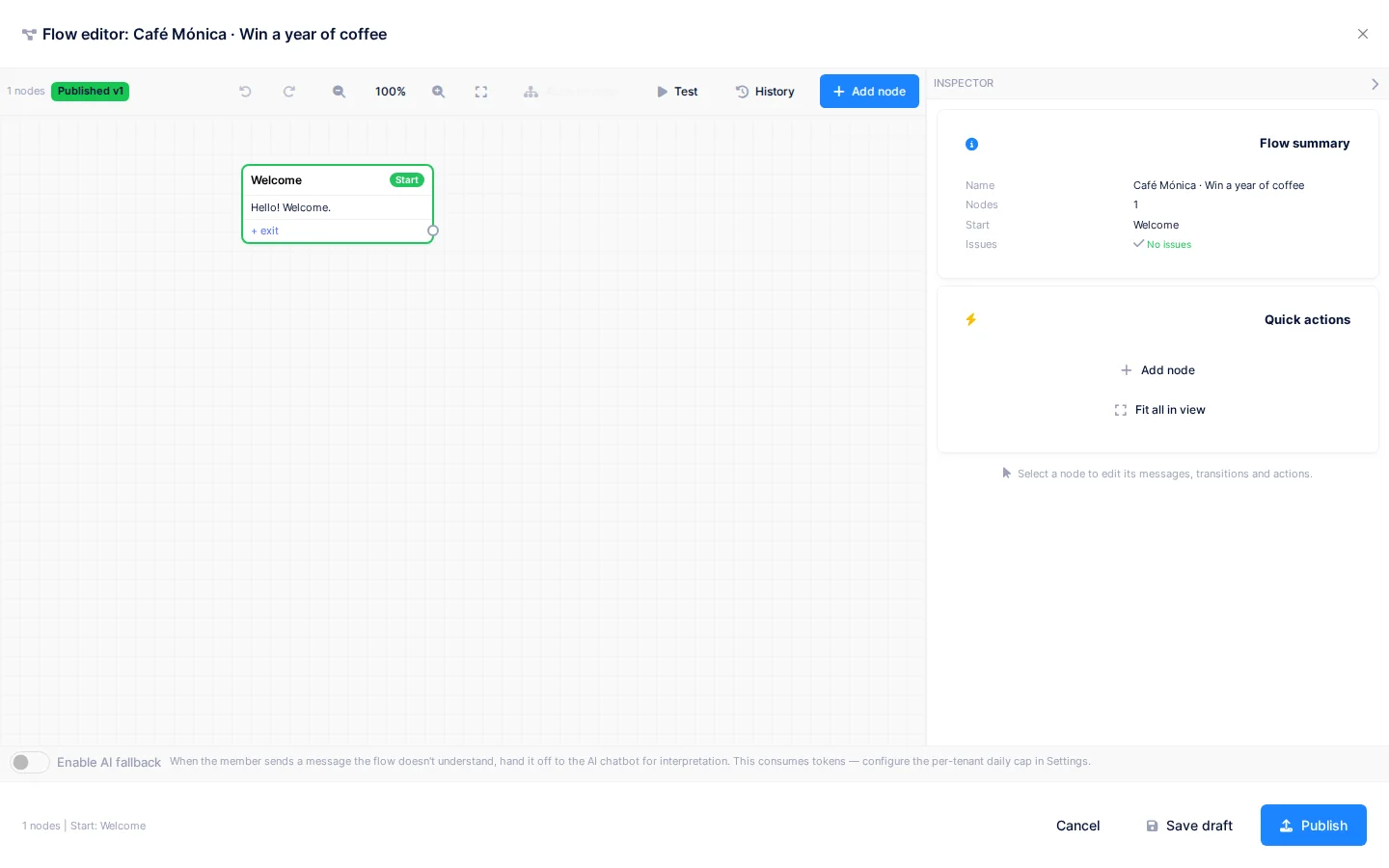
El editor se abre a pantalla completa. Cada paso es una tarjeta; las flechas son las transiciones.
- Añadir nodo abre la paleta con tres pestañas: Mensajes, Disparadores y API.
- En Mensajes tienes Texto, Botones, Lista, Multimedia, Botón URL y Pedir dato.
- En Disparadores tienes Espera, Palabra clave y Fin.
- Haz doble clic en una tarjeta para editarla en el sitio. El panel lateral muestra sus propiedades.
- Pasa el cursor sobre una flecha y pulsa + para insertar un nodo entre dos pasos.
- Mantén Mayús y arrastra sobre el lienzo para seleccionar varias tarjetas; también vale Ctrl/Cmd+A. Se mueven en bloque.
- Auto-ordenar coloca todas las tarjetas de izquierda a derecha y ajusta el zoom. Se deshace con un solo paso.
- Deshacer y Rehacer, y los botones de zoom, están en la barra superior.
Una tarjeta con triángulo de aviso tiene un problema (por ejemplo, una salida sin conectar). El editor los lista y ofrece arreglos de un clic.
Acciones disponibles
En la pestaña API eliges acciones que cambian datos sin enviar mensaje.
| Acción | Qué hace |
|---|---|
| Registrar socio | Da de alta al contacto como socio del programa |
| Registrar participante | Lo inscribe en la campaña sin darlo de alta como socio |
| Aceptar bases | Guarda su consentimiento de las bases vigentes |
| Comprobar datos del participante | Mira qué datos tiene ya el participante para no volver a pedirlos |
| Validar email / Validar teléfono | Comprueban el dato; si falla, el flujo puede volver a preguntarlo |
| Añadir a segmento / Asignar a campaña | Etiqueta al socio o lo apunta a una campaña |
| Otorgar puntos | Suma puntos (se aplican los multiplicadores) |
| Enviar ticket (foto) | Recibe la foto de un ticket y la envía a revisión de evidencias |
| Reclamar ganador instantáneo | Intenta un momento ganador |
| Entregar cupón (stock limitado) | Entrega un cupón mientras queden |
| Reanudar participación | Retoma un intento de momento ganador que esperaba datos |
| Enviar enlace al formulario | Manda un enlace a un formulario web |
| Mostrar confirmación de datos | Repite lo recogido para que el contacto lo confirme |
| Continuar automáticamente (sin esperar) | Avanza sin respuesta del contacto |
| Cerrar conversación | Termina la conversación |
| Guardar respuesta (heredado) | Guarda texto en una variable; usa Pedir dato en flujos nuevos |
Si una acción termina en un resultado sin transición, la conversación se cierra sin avisar al contacto. Conecta todas las salidas, también los límites diarios y los rechazos.
Borrador y publicación
Los cambios se guardan como borrador y no afectan a los socios hasta publicar.
- Pulsa Guardar borrador para conservar tu trabajo.
- Pulsa Publicar. Si hay errores, el editor los lista y no deja publicar. Con avisos te pide confirmar.
- Escribe una Nota opcional que describe el cambio y confirma.
Historial muestra las versiones publicadas. Con Ver las abres en modo lectura; con Restaurar como borrador las recuperas. Descartar borrador vuelve a la última versión publicada.
Probar el flujo
Probar abre un panel que simula la conversación con tu borrador, sin enviar mensajes reales ni guardar datos. Pulsa Reiniciar para empezar de nuevo. Elige un Escenario para probar ramas concretas, o usa Simular formulario completado y Simular foto.
Respuesta con IA
Si activas Activar fallback IA, el texto libre que no encaja con ninguna salida lo interpreta un asistente. Solo puede elegir entre las salidas de ese nodo. Cuesta tokens de IA.
Pulsa Revisar respuestas AI pasadas → para marcar cada respuesta como Buena o Mala. Las malas se reinyectan al modelo como patrones rechazados. Si no quieres IA, añade una salida comodín que lleve a un mensaje "no te he entendido".
Estados y límites
- En WhatsApp, cada teléfono tiene una sola conversación activa. Si escribe de nuevo, continúa donde estaba. Puedes reiniciarla en Conversaciones.
- Las conversaciones de prueba del editor se borran solas pasadas 24 horas.
- Aceptar bases necesita una versión de bases vigente.
- Cada paso queda registrado en el embudo, para ver dónde abandonan los participantes.
Permisos
| Acción | Permiso (texto UI) | id técnico |
|---|---|---|
| Ver flujos y conversaciones | Flujos de conversación | Pages.Communications.Flows |
| Crear, duplicar | Creando flujo | Pages.Communications.Flows.Create |
| Editar, publicar, probar | Editando flujo | Pages.Communications.Flows.Edit |
| Eliminar | Eliminando flujo | Pages.Communications.Flows.Delete |