Momentos ganadores
Un momento ganador es un instante fijado de antemano en el que hay un premio. La primera persona que participa a partir de ese instante se lo lleva. Así repartes los premios a lo largo de toda la campaña. Se gestionan en la pestaña Momentos ganadores de la ficha de campaña.
Permiso Gestionando momentos ganadores · Solo en campañas de tipo Premio instantáneo · Edición Starter o superior.
Momentos o ventanas
Una campaña de Premio instantáneo reparte premios de una de estas dos formas:
- Por probabilidad y ventanas: pestañas Premios y Ventanas ganadoras. Cada participación gana con la probabilidad de la tabla, dentro de las ventanas horarias.
- Por momentos: pestaña Momentos ganadores. Cada momento es un premio concreto en un instante concreto.
No hay un selector. La campaña pasa a repartir por momentos en cuanto añades el primero, y vuelve a probabilidades cuando borras el último. Si la campaña ya tiene ventanas, la pantalla te pide eliminarlas antes: Esta campaña reparte premios por ventanas horarias. Elimina sus ventanas antes de añadir momentos ganadores.
Cuando la campaña reparte por momentos, la pestaña Premios deja de aplicarse.
Listado
| Campo | Qué es | Notas |
|---|---|---|
| Marca de tiempo | Instante en que el premio queda disponible. | Se guarda en UTC; el selector usa tu zona horaria. |
| Premio | Premio del juego asociado. | Opcional. |
| Estado | Sin reclamar, Reclamado o Anulado (sin stock). | |
| Reclamado el | Fecha de la reclamación. | Solo en reclamados. |
| Participante | Quién lo reclamó. | Solo en reclamados. |
Un momento Anulado (sin stock) es el que no se pudo entregar porque su premio no tenía stock. Cuando repongas stock, vuelve a incluirlo en el sorteo desde su fila (Momento reactivado).
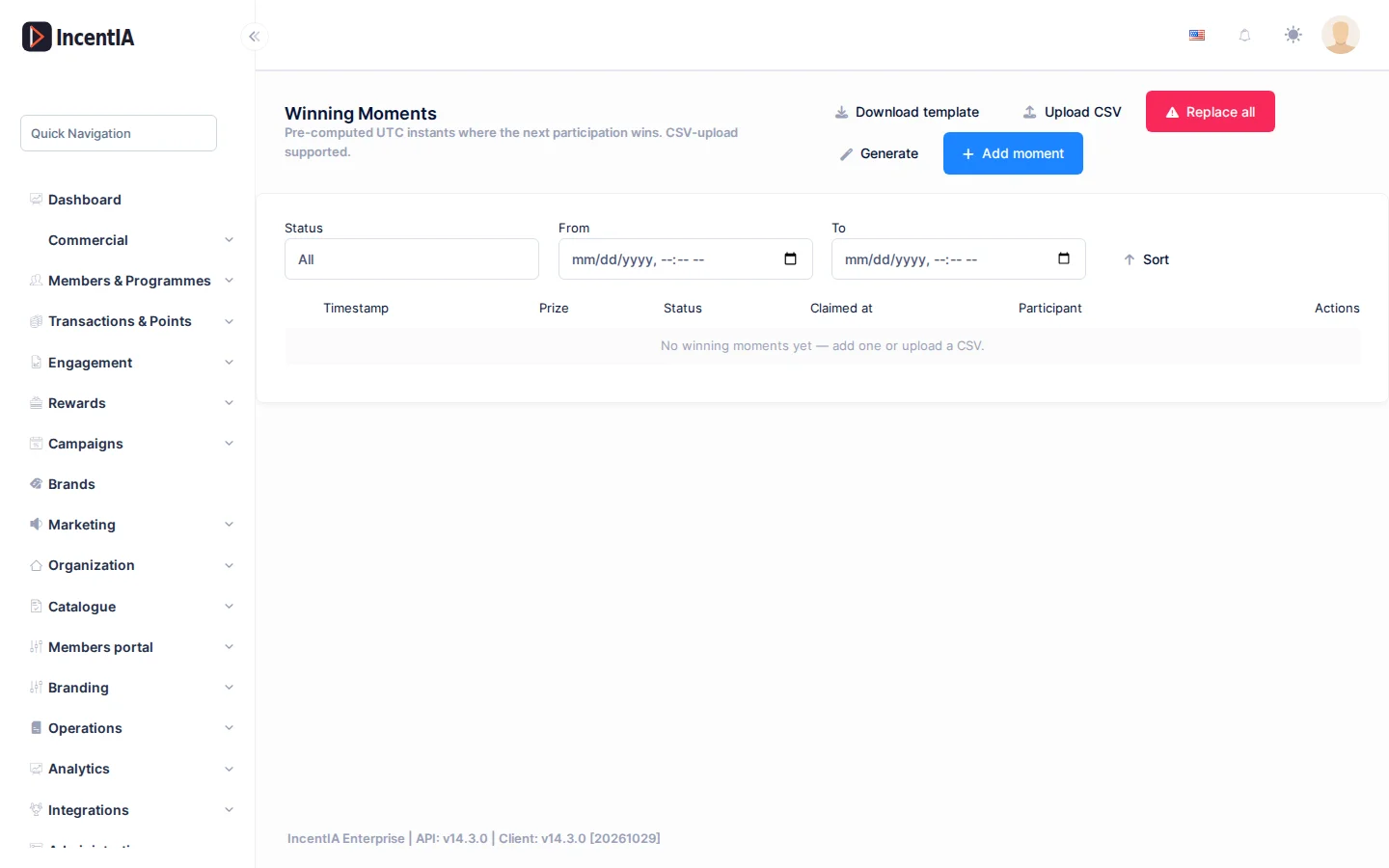
Añadir momentos
Tienes tres formas de crear momentos.
Uno a uno
- Pulsa Añadir momento.
- Indica la Marca de tiempo y, si quieres, el Premio del juego (opcional). Si lo dejas vacío, el motor elige el premio disponible.
- Pulsa Guardar.
Subir un CSV
- Pulsa Descargar plantilla para partir del formato correcto.
- Rellena las columnas
MomentUtc(fecha ISO 8601, obligatoria) yGamePrizeId(opcional). - Pulsa Subir CSV y elige el archivo. Solo se aceptan archivos
.csv. - Revisa el resultado: Insertados, Omitidos y la lista de Errores por Fila.
Generar automáticamente
Pulsa Generar para repartir momentos en un rango de fechas. Indica:
- Número de momentos, Fecha de inicio y Fecha de fin.
- Zona horaria.
- Franjas horarias (Añadir franja horaria), para limitar los momentos a ciertas horas.
- Días excluidos.
- Variación (segundos), para que los instantes no queden a intervalos exactos.
- Cupos de premio (opcional) (Añadir cupo de premio), para repartir cada premio en una cantidad concreta.
Confirma con Generar.
Con la Variación (segundos) evitas que alguien adivine los instantes exactos de los premios.
Reemplazar y borrar
- Reemplazar todo sustituye todos los momentos por un nuevo lote. Pide marcar Entiendo que esta acción no se puede deshacer. y no se puede usar si ya hay momentos reclamados o reservas activas.
- Eliminar seleccionados borra los momentos marcados. Los ya reclamados se omiten.
Reemplazar borra también los premios asignados a los momentos que reemplaza. Haz antes una exportación si necesitas conservar el reparto.
Qué pasa con un momento que nadie reclama
Cada campaña tiene una política de reparto de los momentos que nadie reclama a tiempo. Por defecto el momento queda abierto y lo reclama la siguiente persona que participe. Esta política no se cambia desde la pantalla: pídeselo a soporte si necesitas que los momentos caduquen al final del día o a los pocos segundos.
Cómo reclama el ganador
Cuando alguien gana, recibe un enlace a una página ligera de juego (/g/…) que revela el premio. El resultado ya está decidido en el servidor antes de enviar el enlace, así que la animación es solo visual. Ver la vista del socio en Jugar y descubrir premios.
- El enlace es de un solo uso: al recargarlo, la persona ve una pantalla de "ya jugado".
- Si caduca, la página responde con aviso de enlace caducado.
- La página no se indexa en buscadores ni se puede insertar en otra web.
Estados y límites
- Un mismo ticket no puede ganar dos veces: se comprueba la imagen antes de buscar un momento.
- Al terminar una campaña de premio instantáneo, pasa a
Completedsi todo se reclamó, o aExpired/Desertedsi quedaron momentos sin reclamar.
Permisos
| Acción | Permiso (texto UI) | id técnico |
|---|---|---|
| Ver y gestionar momentos | Gestionando momentos ganadores | Pages.Campaigns.ManageWinningMoments |
| Ver la ficha y las demás pestañas | Campañas / Editando campaña | Pages.Gamification.Campaigns / Pages.Gamification.Campaigns.Edit |
Relacionado
- Concepto: Campañas
- Guía: Lanzar un cashback con ticket
- Ficha de campaña · Landing de campaña