Winning moments
A winning moment is an instant fixed in advance at which there is a prize. The first person to participate from that instant onwards wins it. This is how you spread prizes across the whole campaign. They are managed in the Winning Moments tab of the campaign detail.
Managing Winning Moments permission · Only in Instant win campaigns · Starter edition or above.
Moments or windows
An Instant win campaign hands out prizes in one of two ways:
- By probability and windows: Prizes and Winning Windows tabs. Each participation wins with the probability in the table, within the time windows.
- By moments: Winning Moments tab. Each moment is a specific prize at a specific instant.
There is no selector. The campaign switches to handing out by moments as soon as you add the first one, and goes back to probabilities when you delete the last. If the campaign already has windows, the screen asks you to remove them first: This campaign draws prizes by time windows. Remove its prize windows before adding winning moments.
When the campaign hands out by moments, the Prizes tab no longer applies.
List
| Field | What it is | Notes |
|---|---|---|
| Timestamp | Instant at which the prize becomes available. | Stored in UTC; the picker uses your time zone. |
| Prize | Prize of the associated game. | Optional. |
| Status | Unclaimed, Claimed or Voided (no stock). | |
| Claimed at | Date of the claim. | Only for claimed moments. |
| Participant | Who claimed it. | Only for claimed moments. |
A Voided (no stock) moment is one that could not be delivered because its prize had no stock. When you restock, include it in the draw again from its row (Moment re-enabled).
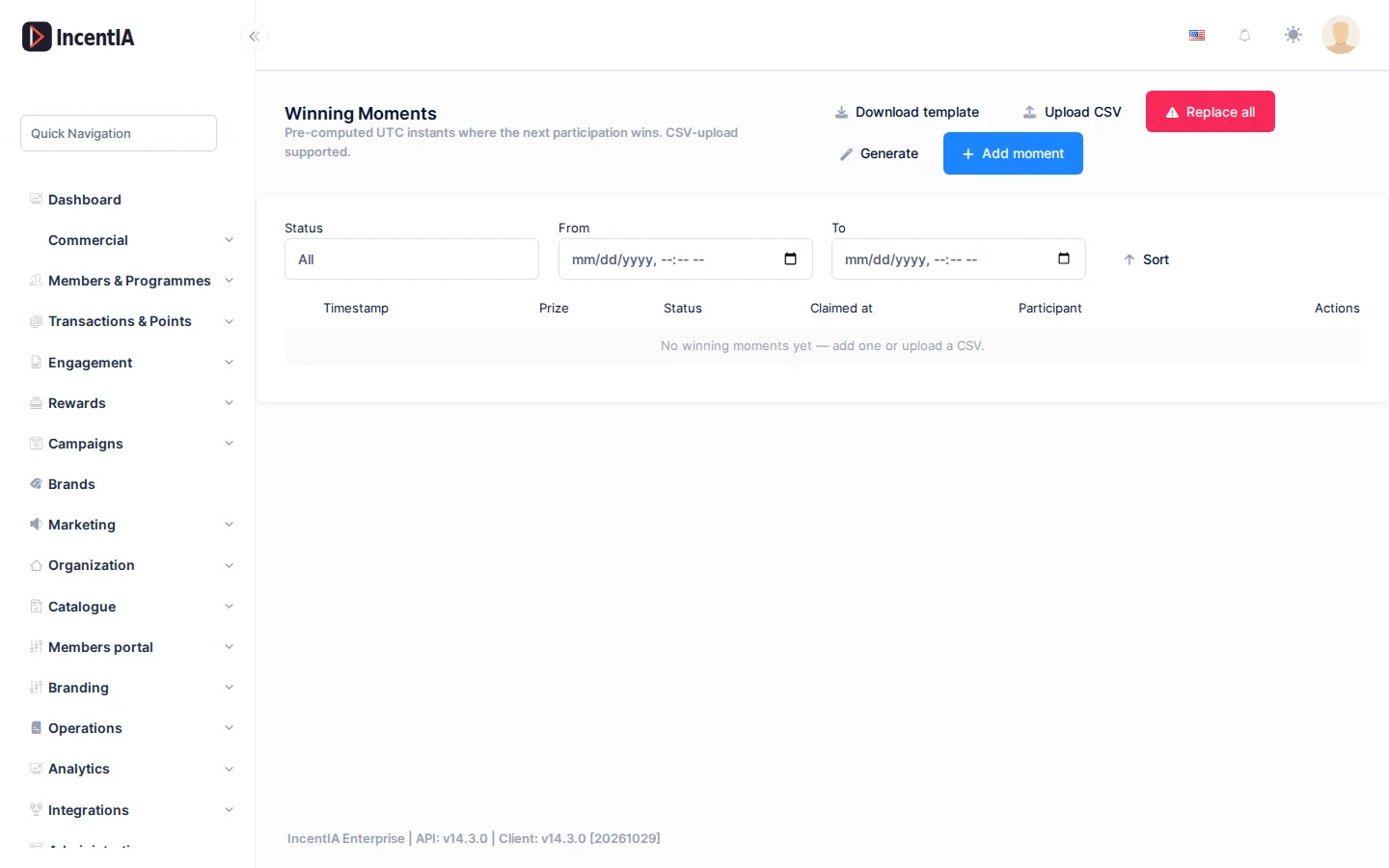
Add moments
There are three ways to create moments.
One by one
- Click Add moment.
- Enter the Timestamp and, if you wish, the Game prize (optional). If you leave it empty, the engine picks the available prize.
- Click Save.
Upload a CSV
- Click Download template to start from the right format.
- Fill in the columns
MomentUtc(ISO 8601 date, required) andGamePrizeId(optional). - Click Upload CSV and choose the file. Only
.csvfiles are accepted. - Review the result: Inserted, Skipped and the list of Errors by Row.
Generate automatically
Click Generate to spread moments across a date range. Enter:
- Number of moments, Start date and End date.
- Timezone.
- Time bands (Add time band), to limit the moments to certain hours.
- Excluded days.
- Jitter (seconds), so that the instants do not fall at exact intervals.
- Prize quotas (optional) (Add prize quota), to spread each prize over a specific quantity.
Confirm with Generate.
With Jitter (seconds) you stop anyone guessing the exact instants of the prizes.
Replace and delete
- Replace all replaces all the moments with a new batch. It requires ticking I understand this action cannot be undone. and cannot be used if there are already claimed moments or active reservations.
- Delete selected deletes the ticked moments. Those already claimed are skipped.
Replacing also deletes the prizes assigned to the moments it replaces. Do an export first if you need to keep the distribution.
What happens to a moment nobody claims
Each campaign has a policy for moments that nobody claims in time. By default the moment stays open and the next person to participate claims it. This policy cannot be changed from the screen: ask support if you need moments to expire at the end of the day or after a few seconds.
How the winner claims
When someone wins, they receive a link to a lightweight game page (/g/…) that reveals the prize. The result is already decided on the server before the link is sent, so the animation is purely visual. See the member's view in Play and discover prizes.
- The link is single-use: when reloaded, the person sees an "already played" screen.
- If it expires, the page responds with an expired-link notice.
- The page is not indexed by search engines and cannot be embedded in another website.
Statuses and limits
- The same receipt cannot win twice: the image is checked before looking for a moment.
- When an instant win campaign ends, it moves to
Completedif everything was claimed, or toExpired/Desertedif unclaimed moments were left.
Permissions
| Action | Permission (UI text) | Technical id |
|---|---|---|
| View and manage moments | Managing Winning Moments | Pages.Campaigns.ManageWinningMoments |
| View the detail page and the other tabs | Campaigns / Editing Campaign | Pages.Gamification.Campaigns / Pages.Gamification.Campaigns.Edit |
Related
- Concept: Campaigns
- Guide: Launch cashback with a receipt
- Campaign detail · Campaign landing page