Getting started with the field rep app
The field rep app lets you link booklets to stores and register new shops from your mobile, without going through the admin panel.
- You need an invitation from your administrator and an account with the Comercial role.
- Required permission: Associate Store (
Pages.Stores.Associate). Without it you will see No access.
1. Create your password
You receive an email with a Create password button. Open it and set your password. The link expires after a few hours; if it has expired, ask your administrator to resend the invitation.
2. Sign in to the app
Open /rep in your mobile browser (or the link you were given) and sign in. If your account is field rep only, you go straight to the app when you sign in.
Allow access to the camera and location when the browser asks: you need them to scan booklets and locate stores.
3. Learn the shortcuts
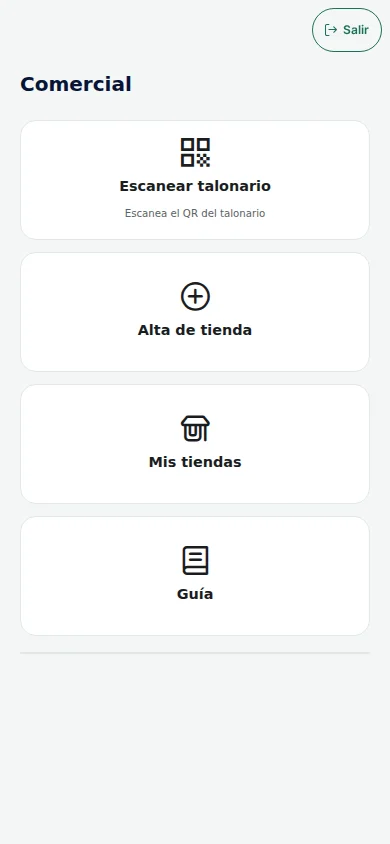
On the home screen you see four buttons:
| Button | What it is for |
|---|---|
| Scan booklet | Scan a booklet's QR code and link it to a store. See Booklets |
| Register store | Register a new store. See Your stores |
| My stores | View and edit your stores |
| Guide | Read the quick guide and frequently asked questions |
The Exit button signs you out.
4. Add it to your home screen
To open it like an app:
- Android (Chrome): menu ⋮ → Add to home screen.
- iPhone (Safari): Share button → Add to Home Screen.
If you cannot sign in
| Symptom | What to do |
|---|---|
| No access | Ask an administrator to assign you the Comercial role |
| I denied GPS on Android | Chrome → padlock next to the address → Permissions → Location → Allow. Also check that your phone's location is switched on |
| I denied GPS on iPhone | Settings → Privacy & Security → Location Services → Safari → While Using the App, and switch on Precise Location |
Next steps
For the operator
Invite and organise your field reps in Field reps (guide: Invite your field reps). The Comercial role only grants Associate Store and Creating Store. The brand assigned to the field rep defines the app's logo and colours.