Analytics dashboards
The analytics dashboards answer "how is my programme doing?" with figures and charts for a period. Menu: Analytics › Loyalty, Analytics › Rewards, Analytics › Engagement and Analytics › Communications.
Each dashboard requires the permission for its area: Loyalty Programmes (Loyalty), Rewards (Rewards), Games (Engagement) and Channels (Communications) · Edition: all
To see the home page with the day-to-day indicators, read The dashboard. For members' churn risk, read Churn prediction.
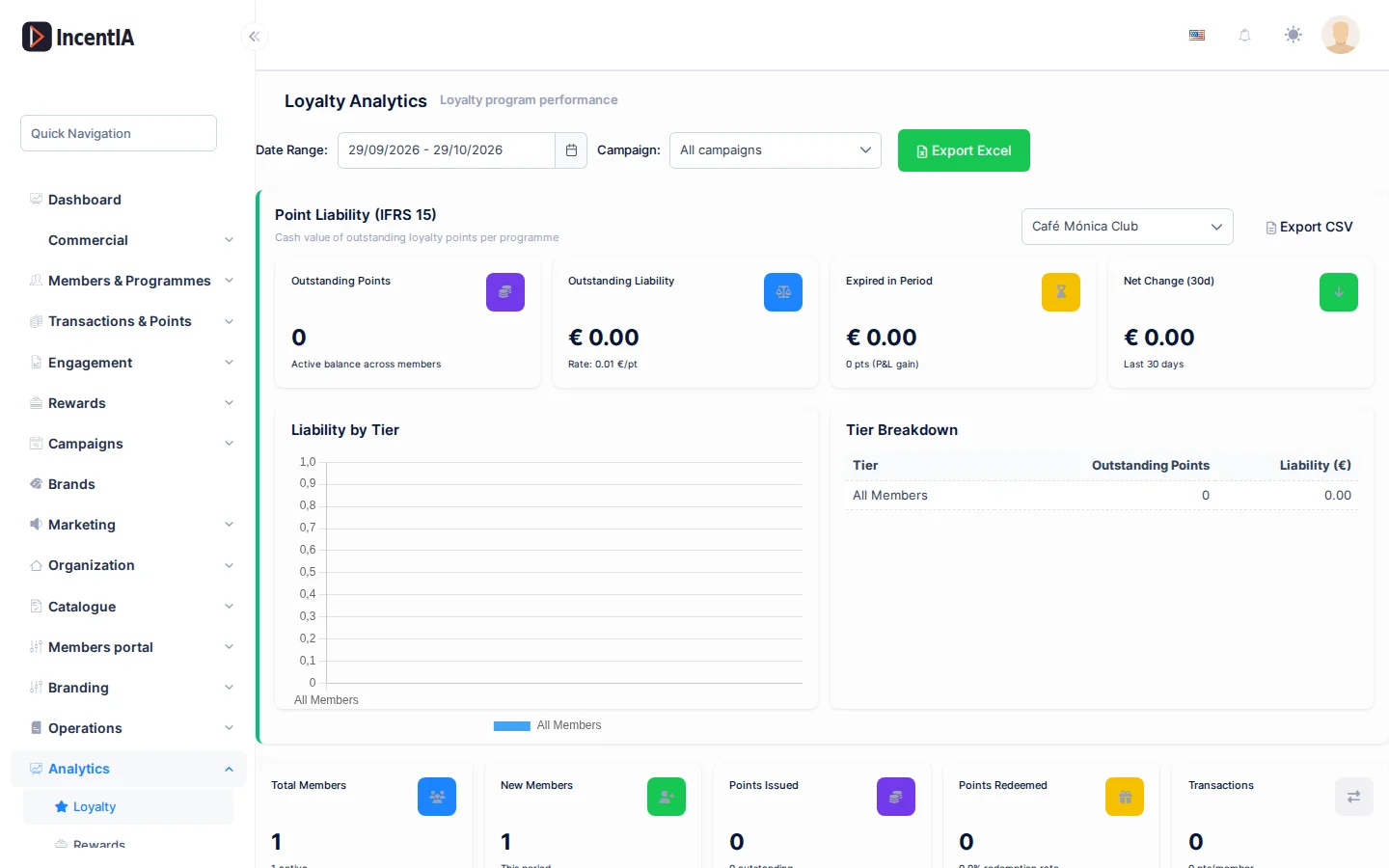
These dashboards' labels are shown in English.
Filters and export
All four dashboards share the top bar:
| Control | What it does | Notes |
|---|---|---|
| Date Range: | Period being analysed | Starts on the last 30 days. Changing it reloads the dashboard |
| Campaign: | Limits the figures to one campaign | Starts on All campaigns. You can search by name |
| Channel: | Communications only: filters by channel | All, Email, WhatsApp, Telegram, SMS, Push, InApp |
| Export to Excel | Downloads the dashboard as Excel | Respects the chosen period and campaign |
When you filter by campaign, some figures disappear and the notice N metrics hidden — no campaign attribution appears. These are data that cannot be attributed to a campaign (accumulated balances, tiers, programme-wide status). They are hidden so as not to show a false zero. On the Loyalty dashboard, the indicators are renamed: Members Acquired, Points Earned, Points Redeemed and Transactions.
Loyalty
Shows the state of your points programmes.
| Block | What you see |
|---|---|
| Indicators | Total Members (and how many are active), New Members, Points Issued, Points Redeemed (with the redemption rate), Transactions, Points Expired |
| Charts | Points Trend, Member Growth, Tier Distribution, Transaction Breakdown |
| Top Members | The members with the most points |
| Evidence review SLA | Pending evidence, the oldest, average approval time (7 days) and breaches of the 48-hour deadline |
| Churn Prediction | Summary of churn risk by programme. For the detail use Churn prediction |
Points liability
The Point Liability (IFRS 15) block calculates how much your members' unredeemed points are worth in money. Choose a programme in Select programme.
| Indicator | What it is |
|---|---|
| Outstanding Points | Active points across all members |
| Outstanding Liability | Monetary value of those points, using the programme's conversion rate |
| Expired in Period | Value of the points that expired in the period |
| Net Change (30d) | Change in the liability over the last 30 days |
| Liability by Tier and Tier Breakdown | Breakdown by tier |
Click Export liability CSV to download the detail, for example for your accounting team.
Rewards
Shows what your members redeem.
| Block | What you see |
|---|---|
| Indicators | Redemptions Made and points spent, Active Coupons, Gift Cards (active and redeemed), Active Auctions and bids, Premium Memberships |
| Charts | Redemption Status, Redemption Trend, Rewards by Type, Coupons by Type |
| Top Rewards | Reward, Redemptions and Points Spent for the most redeemed rewards |
Engagement
Shows participation in games, challenges and badges.
| Block | What you see |
|---|---|
| Indicators | Games Played, Points Won, Challenges, Badges Awarded, Active Campaigns, Active Streaks |
| Charts | Games by Type, Games Trend, Badges by Category |
| Top Challenges | Enrolled, Completed and Rate per challenge |
| Game Performance | Per game: Type, Plays, Players, Wins, Rate and Points Won |
| Campaigns | Per campaign: Status, Start, End, Multiplier and Bonus Points |
Communications
Shows the performance of your messages and conversations.
| Block | What you see |
|---|---|
| Indicators | Messages Sent, Messages Received, Delivery Rate, Open Rate, Active Conversations, Evidence |
| Charts | Delivery Funnel, Message Trend, Conversation Status (with the Bot: and Human: breakdown) |
| Top Flows | Conversations, Completed and Rate per flow |
| Evidence Status and Evidence Summary | Evidence received per conversation: extracted amount, points awarded and approval rate |
| Channel Preferences | Your members' preferred channel |
If you filter by campaign, Outbound messages may be under-reported for this campaign — partial attribution may appear: sent messages cannot always be attributed to a campaign.
Permissions
| Dashboard | Permission (UI text) | Technical id |
|---|---|---|
| Loyalty | Loyalty Programmes | Pages.Loyalty.Programs |
| Rewards | Rewards | Pages.Loyalty.Rewards |
| Engagement | Games | Pages.Gamification.Games |
| Communications | Communications (the menu entry requires Channels) | Pages.Communications (menu: Pages.Communications.Channels) |
Related
- The dashboard: the home page indicators.
- Churn prediction: who is about to leave.
- Evidence review: to empty the queue that the SLA measures.
- Campaign detail: analytics for a specific campaign.