Catalogue
This is where you define the rewards members redeem with their points. Menu: Rewards › Catalogue.
Availability
Rewards permission · Edition: all (Free, Starter, Pro, Growth, Enterprise)
List
The screen shows a table with search (Search...), the Refresh button and Export CSV.
| Column | What it is | Notes |
|---|---|---|
| Name | Name the member sees | |
| Reward Type | Physical, digital, experience, discount or cashback | See the types below |
| Status | Available, out of stock or disabled | |
| Points Cost | Points deducted on redemption | |
| Stock | Units remaining | Empty = no stock control |
Under Actions you have Edit and Delete. Deleting asks for confirmation and can't be undone.
Create / edit
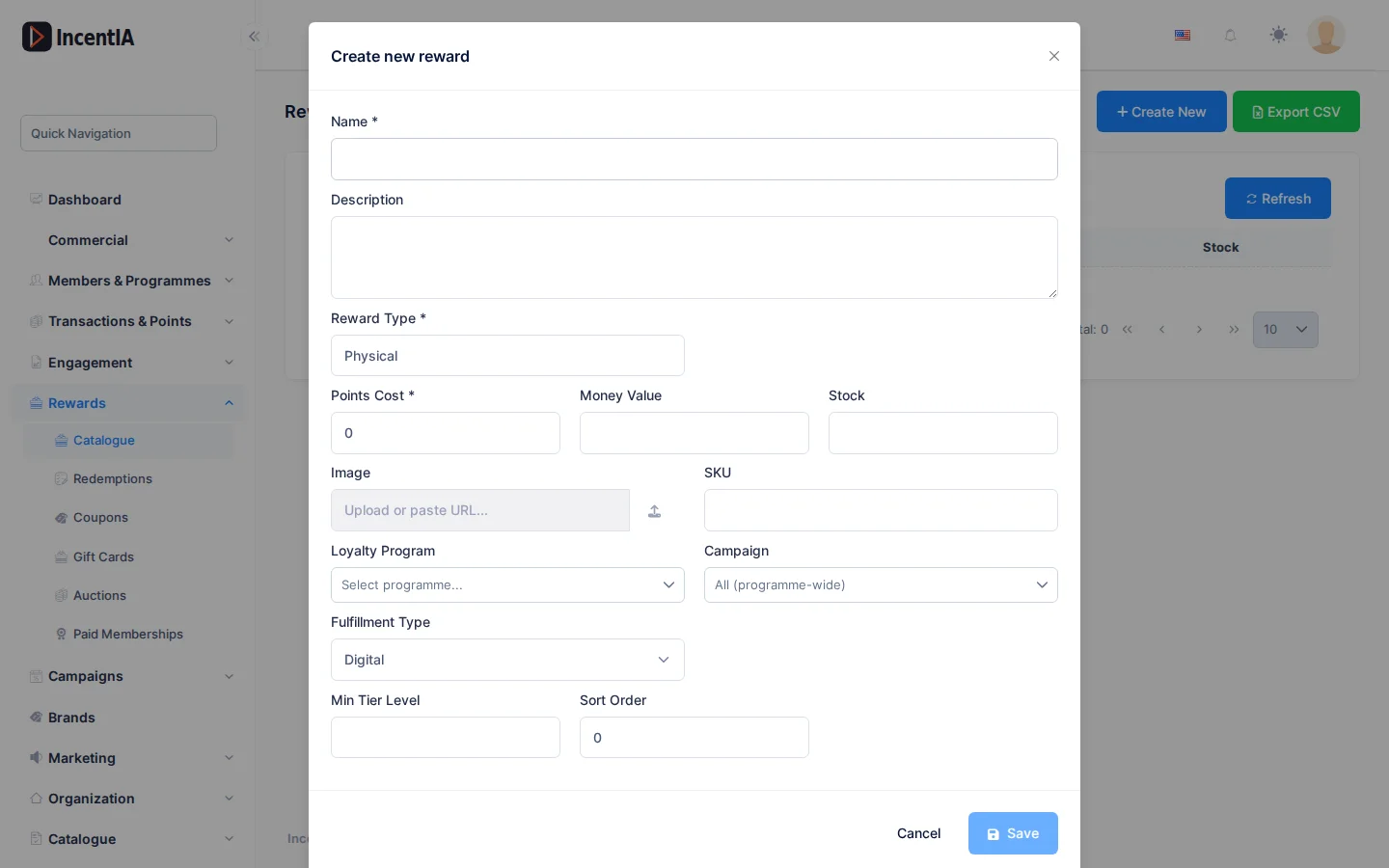
Click Create New and fill in the form. Fields marked * are required.
| Field | What it is | Notes |
|---|---|---|
| Name * | Visible name | Up to 256 characters |
| Description | What it is and how it is redeemed | Up to 2000 characters |
| Reward Type * | Physical, Digital, Experience, Discount, Cashback | The interface shows these values in English |
| Status | Available, OutOfStock, Disabled | Only when editing |
| Points Cost * | Cost in points | |
| Money Value | Monetary value of the reward | Required if you use a gift card provider |
| Stock | Units available | Editable when creating; when editing, use Adjust |
| Image | Reward image | |
| SKU | Internal code | |
| Loyalty Programme | Programme it belongs to | |
| Campaign | Restricts the reward to a campaign | Empty = the whole programme |
| Fulfillment Type | Digital, Ship, In-Store, External | How it is delivered |
| Min Tier Level | Minimum member tier to redeem it | Tier number |
| Sort Order | Position in the list | |
| Gift Card Provider | Only if the type is Digital | See Gift cards |
Adjust stock
When editing a reward with stock, the Stock field is locked. Type a signed quantity (+10 or -3) and click Adjust to replenish or write off units. Stock goes down automatically with each redemption.
tip
Cancelling a redemption returns the unit to stock and the points to the member.
Statuses and limits
- Available: can be redeemed.
- OutOfStock and Disabled: can't be redeemed.
- Min Tier Level restricts redemption by the member's tier; there is no per-member redemption limit or validity period on this form.
Permissions
| Action | Permission (UI text) | Technical id |
|---|---|---|
| View the catalogue | Rewards | Pages.Loyalty.Rewards |
| Create | Creating Reward | Pages.Loyalty.Rewards.Create |
| Edit | Editing Reward | Pages.Loyalty.Rewards.Edit |
| Delete | Deleting Reward | Pages.Loyalty.Rewards.Delete |