Coupons
Manage discount codes, one by one or in batches. Menu: Rewards › Coupons.
Availability
Coupons permission · Edition: all. Bulk generation requires Growth or Enterprise.
List
| Column | What it is | Notes |
|---|---|---|
| Code | Coupon code | |
| Name | Internal name | |
| Programme | Loyalty programme | |
| Coupon type | Type of discount | See below |
| Status | Active, Used, Expired or Cancelled | |
| Discount value | Amount or percentage | |
| Uses | Recorded uses | |
| Valid until | End of validity |
There is a search box (Search...) and Refresh. Under Actions: Edit and Delete.
Create / edit
Click Create New.
| Field | What it is | Notes |
|---|---|---|
| Code | Code the member enters | If left empty, it is generated automatically |
| Name * | Internal name | |
| Description | Details | |
| Coupon type * | FixedDiscount, PercentageDiscount, FreeProduct, FreeShipping, Custom | |
| Status | Active, Used, Expired, Cancelled | |
| Discount value * | Amount or percentage | |
| Max uses | Total uses of the coupon | |
| Max Uses per Member | Uses per member | |
| Points Cost | Points it costs to obtain the coupon | Optional |
| Min Tier Level | Minimum member tier | |
| Loyalty Programme | Associated programme | |
| Valid from / Valid until | Validity window |
Generate coupons in bulk
- Click Bulk Generate (top right).
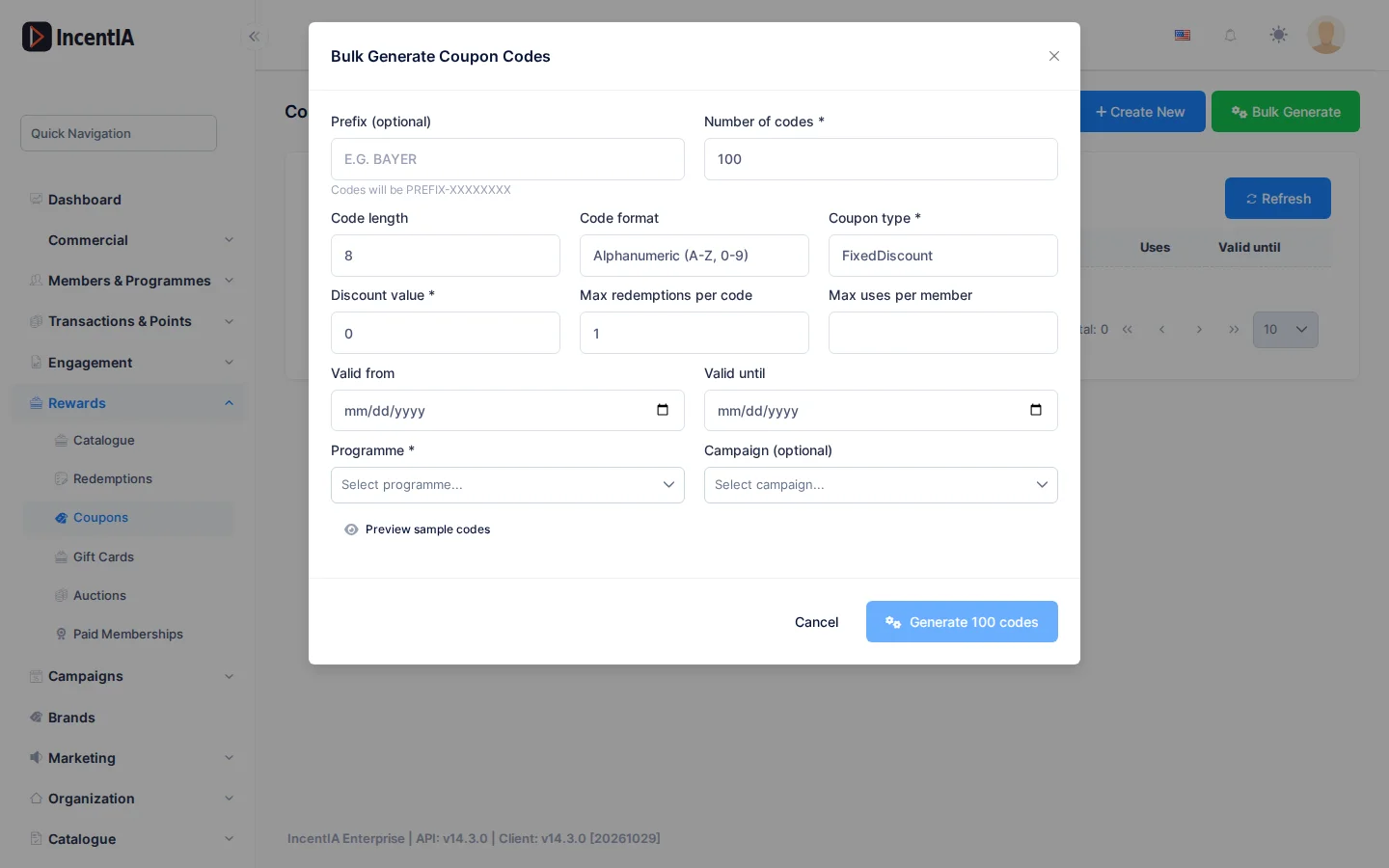
- Fill in the Bulk Generate Coupon Codes dialog:
- Prefix (optional): up to 20 characters; codes will be
PREFIX-XXXXXXXX. - Number of codes: from 1 to 10,000.
- Code length: from 4 to 20.
- Code format: alphanumeric, numeric or letters only.
- Coupon type, Discount value, Max redemptions per code, Max uses per member.
- Valid from / Valid until, Programme (required) and Campaign (optional).
- Prefix (optional): up to 20 characters; codes will be
- Click Preview sample codes to see examples.
- Click Generate N codes. When it finishes, Download CSV downloads the codes.
tip
Download the CSV when it finishes: it is the most convenient way to hand the codes to your agency or your store.
Statuses and limits
- A
Used,ExpiredorCancelledcoupon can no longer be redeemed. - Bulk generation requires the bulk coupon generation feature (Growth and Enterprise) and the permission to create coupons.
Permissions
| Action | Permission (UI text) | Technical id |
|---|---|---|
| View coupons | Coupons | Pages.Loyalty.Coupons |
| Create and bulk generate | Creating Coupon | Pages.Loyalty.Coupons.Create |
| Edit | Editing Coupon | Pages.Loyalty.Coupons.Edit |
| Delete | Deleting Coupon | Pages.Loyalty.Coupons.Delete |